Message Queues Trong Production: Từ Địa Ngục Synchronous Đến Thiên Đường Async
Hướng dẫn toàn diện về RabbitMQ, Kafka, xử lý bất đồng bộ, retry patterns và kiến trúc event-driven

Message Queues Trong Production: Từ Địa Ngục Synchronous Đến Thiên Đường Async
#Hướng dẫn toàn diện về RabbitMQ, Kafka, xử lý bất đồng bộ, retry patterns và kiến trúc event-driven
#Giới Thiệu
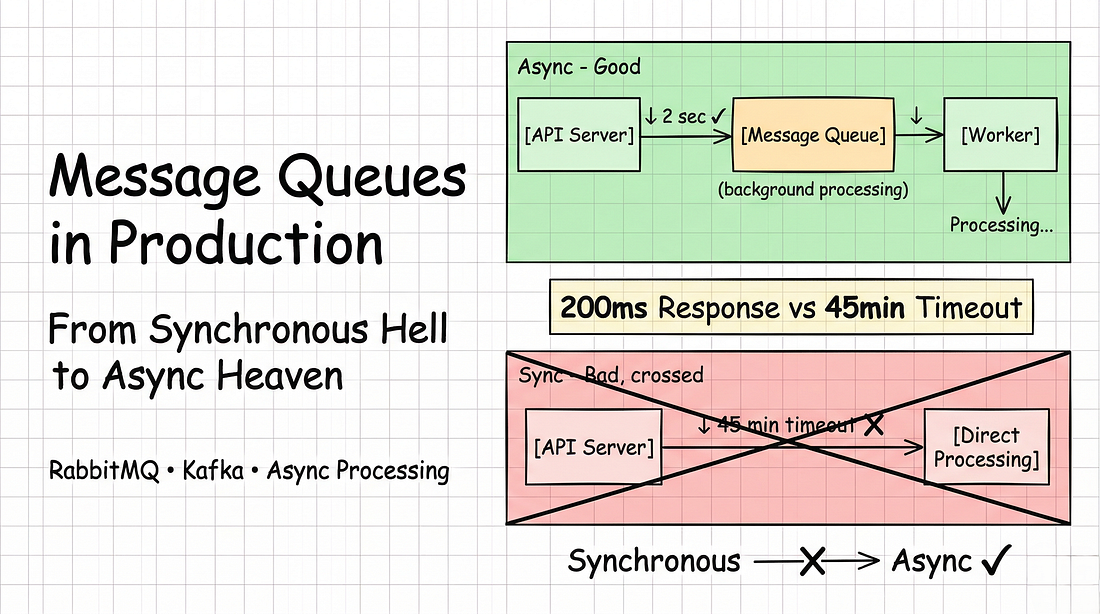
Một API đã chết khi xử lý file upload.
User upload một video 100MB.
Server cố gắng xử lý đồng bộ.
Request timeout:
- 30 giây.
- Thời gian xử lý thực tế: 5 phút.
Kết quả:
- Timeout.
- Upload thất bại.
- User tức giận.
Sau đó, message queues xuất hiện.
- Cùng file upload đó giờ phản hồi trong 2 giây.
- Xử lý trong background.
- User nhận thông báo khi hoàn thành.
Đây là hướng dẫn toàn diện về message queues trong production — tại sao synchronous processing thất bại, queues giải quyết nó thế nào, RabbitMQ vs Kafka, retry patterns, và kiến trúc production với code thực tế.
Bạn sẽ học:
- Tại sao synchronous processing sụp đổ khi scale
- Message queue fundamentals (RabbitMQ và Kafka)
- Async processing patterns
- Cơ chế retry và error handling
- Kiến trúc production hoàn chỉnh
- Ví dụ triển khai thực tế
Bắt đầu thôi.
#Phần 1: Vấn Đề Synchronous
#Khi Blocking Trở Thành Breaking
Hầu hết ứng dụng bắt đầu với synchronous.
Luồng đơn giản:
User Request → Server Processes → Return ResponseĐiều này hoạt động cho đến khi nó không còn hoạt động.
Kịch bản thực tế: Tính năng Email Campaign.
Marketing muốn gửi newsletter cho tất cả users.
@app.post("/send-newsletter")
def send_newsletter():
    users = db.query("SELECT * FROM users WHERE subscribed = true")
    for user in users:
        send_email(user.email, newsletter_content)
return {"message": "Done"}Kỳ vọng: Gửi 10K email, trả về thành công.
Những gì đã xảy ra:
- Button được nhấn lúc 2:00 PM.
- Server bắt đầu xử lý.
- Một email mỗi 500ms.
Timeline:
- 2:00 PM: Request bắt đầu
- 2:01 PM: 120 email đã gửi
- 2:10 PM: Refresh trang "Xong chưa?"
- 2:30 PM: Vẫn đang xử lý (3.600 đã gửi)
- 2:45 PM: Request timeout
Kết quả:
- Chỉ 5.400 email được gửi.
- 4.600 users bị bỏ lỡ.
- Server bị block trong 45 phút.
- Các request khác bị xếp hàng.
- Response time tăng vọt lên 30+ giây.
- Thảm họa hoàn toàn.
#Tại Sao Synchronous Thất Bại
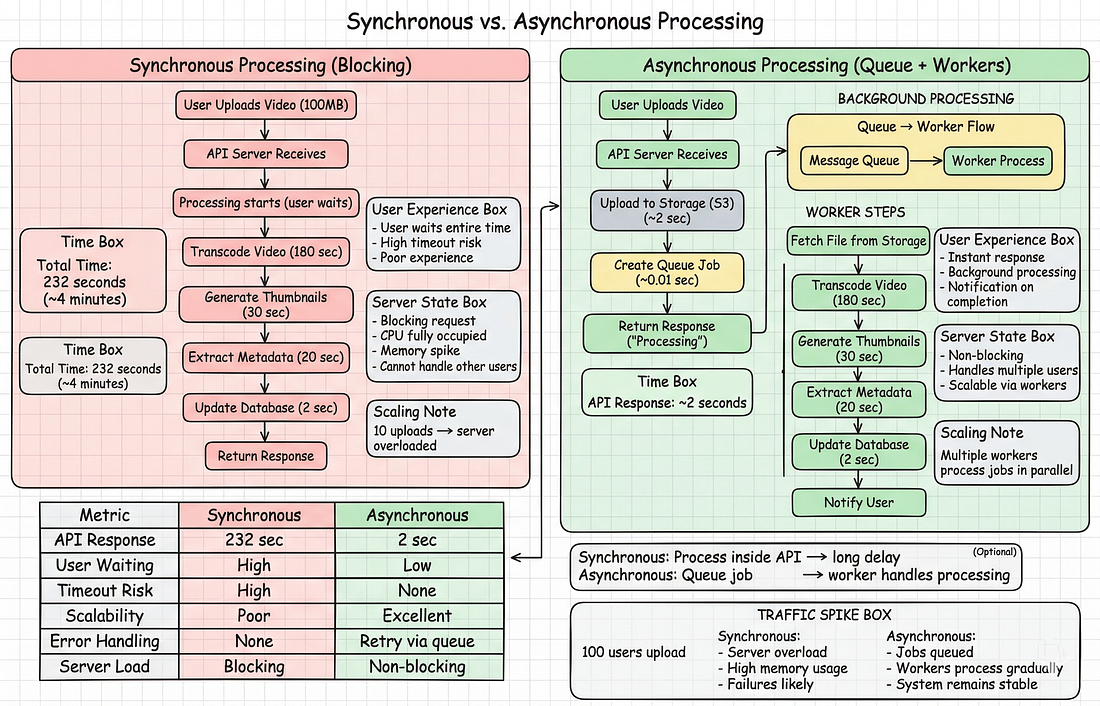
Vấn đề 1: Timeouts
HTTP có giới hạn:
- API Gateway: 30 giây
- Load balancer: 60 giây
- Browser: 120 giây
Các tác vụ dài vượt quá các giới hạn này.
Vấn đề 2: Blocking tài nguyên
Server không thể xử lý request khác trong khi gửi 10K email.
- Toàn bộ CPU dành cho một tác vụ.
Vấn đề 3: Không có khả năng phục hồi
Server crash tại email thứ 4.739?
- Mất tất cả tiến trình.
- Phải bắt đầu lại từ đầu.
Vấn đề 4: Không thể scale
Thêm server?
- Không giúp ích gì.
- Công việc gắn với một request duy nhất.
Vấn đề 5: User phải chờ
User không cần đợi tất cả 10K email.
Họ chỉ cần xác nhận.
#Phần 2: Message Queues — Giải Pháp
#Message Queue Là Gì?
Hãy nghĩ như hộp thư bưu điện:
- Bỏ thư (messages) vào hộp.
- Không cần đợi gửi.
- Bưu điện nhặt chúng sau, gửi theo tốc độ của họ.
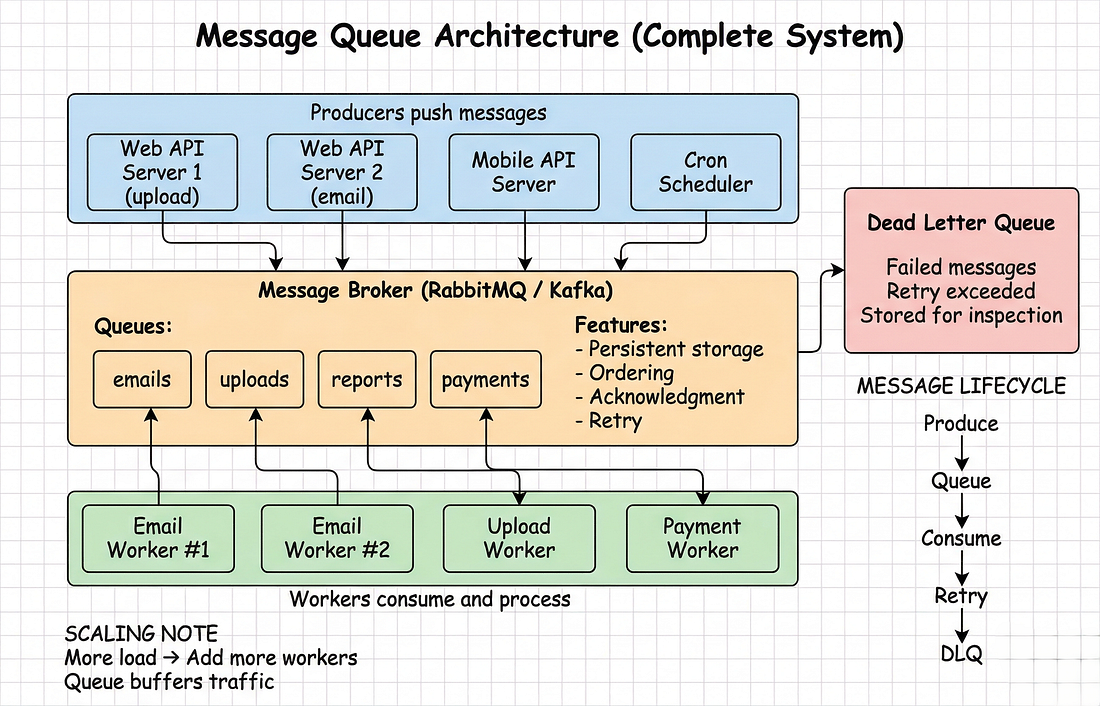
Components:
- Producer: Tạo messages (API của bạn)
- Queue: Lưu trữ messages (RabbitMQ, Kafka)
- Consumer: Xử lý messages (background worker)
Producer và consumer được tách rời. Chúng giao tiếp qua queue.
#Cách Nó Hoạt Động
Email campaign đã được refactor:
# Producer (API) - Trả về ngay lập tức
@app.post("/send-newsletter")
def send_newsletter():
    users = db.query("SELECT * FROM users WHERE subscribed = true")

    # Queue tất cả email jobs (chỉ mất 3 giây)
    for user in users:
        queue.push({
            "type": "send_email",
            "to": user.email,
            "template": newsletter_content
        })

    return {"status": "queued", "total": len(users)}
# Response ngay lập tức!# Consumer (Background Worker) - Xử lý từ từ
def process_message(message):
if message["type"] == "send_email":
send_email(message["to"], message["template"])
message.ack() # Xác nhận đã xử lýTrước đây (Synchronous):
- API xử lý tất cả 10K email
- Mất 83 phút (500ms × 10K)
- Timeout sau 30 phút
- Chỉ 3.600 email được gửi
- Server bị block
Sau đó (Asynchronous):
- API xếp hàng 10K jobs trong 3 giây
- Trả về ngay lập tức
- Worker xử lý 1.000 email/phút
- Tất cả 10K được gửi trong 10 phút
- Server không bao giờ bị block
- Có thể thêm worker để tăng tốc
#Lợi Ích
1. Phản hồi nhanh
- Queue 1 message: 1ms
- Queue 10K messages: 3 giây
- User nhận xác nhận ngay lập tức
2. Horizontal scaling
- 1 worker: 1.000 email/phút
- 5 workers: 5.000 email/phút
- 10 workers: 10.000 email/phút
3. Tự động retry
- Worker thất bại?
- Message trở về queue.
- Retry tự động.
4. Traffic smoothing
- 1.000 users upload file?
- Xếp hàng tất cả.
- Workers xử lý với tốc độ ổn định.
- Không bị quá tải.
5. Cách ly lỗi
- Email service bị down?
- Messages đợi trong queue.
- Service hồi phục?
- Xử lý tiếp tục.
#Phần 3: Triển Khai RabbitMQ
#Tại Sao Bắt Đầu Với RabbitMQ?
RabbitMQ là dễ học nhất:
- Cài đặt đơn giản (30 phút)
- Hoàn hảo cho task queues
- Tài liệu tuyệt vời
- Xử lý 90% use cases
Bắt đầu ở đây trước khi chuyển sang Kafka.
#Cài Đặt
# Docker
docker run -d \
  --name rabbitmq \
  -p 5672:5672 \
  -p 15672:15672 \
  rabbitmq:3-management

# UI Management: http://localhost:15672 (guest/guest)#Producer Example
import pika
import json

class QueueProducer:
    def __init__(self):
        self.connection = pika.BlockingConnection(
            pika.ConnectionParameters('localhost')
        )
        self.channel = self.connection.channel()
        self.channel.queue_declare(queue='tasks', durable=True)

    def push(self, message: dict):
        self.channel.basic_publish(
            exchange='',
            routing_key='tasks',
            body=json.dumps(message),
            properties=pika.BasicProperties(
                delivery_mode=2,  # Persistent
            )
        )

    def close(self):
        self.connection.close()

producer = QueueProducer()
producer.push({"type": "send_email", "to": "user@example.com"})#Consumer Example
import pika
import json

class QueueConsumer:
    def __init__(self):
        self.connection = pika.BlockingConnection(
            pika.ConnectionParameters('localhost')
        )
        self.channel = self.connection.channel()
        self.channel.queue_declare(queue='tasks', durable=True)
        self.channel.basic_qos(prefetch_count=1)  # One message at a time

    def start_consuming(self):
        self.channel.basic_consume(
            queue='tasks',
            on_message_callback=self.process_message
        )
        print("Waiting for messages...")
        self.channel.start_consuming()

    def process_message(self, ch, method, properties, body):
        message = json.loads(body)
        try:
            if message["type"] == "send_email":
                send_email(message["to"], message["template"])
            ch.basic_ack(delivery_tag=method.delivery_tag)  # Xác nhận thành công
        except Exception as e:
            print(f"Error: {e}")
            ch.basic_nack(delivery_tag=method.delivery_tag, requeue=True)  # Retry sau

consumer = QueueConsumer()
consumer.start_consuming()#Production Patterns
Async API endpoint:
from fastapi import FastAPI

app = FastAPI()
producer = QueueProducer()

@app.post("/send-newsletter")
async def send_newsletter():
    users = db.query("SELECT * FROM users WHERE subscribed = true")

    for user in users:
        producer.push({
            "type": "send_email",
            "to": user.email,
            "user_id": user.id
        })

    return {
        "status": "queued",
        "total": len(users),
        "estimated_time": "~2 minutes"
    }
    # Response trong 2 giây (thay vì 30 phút đồng bộ)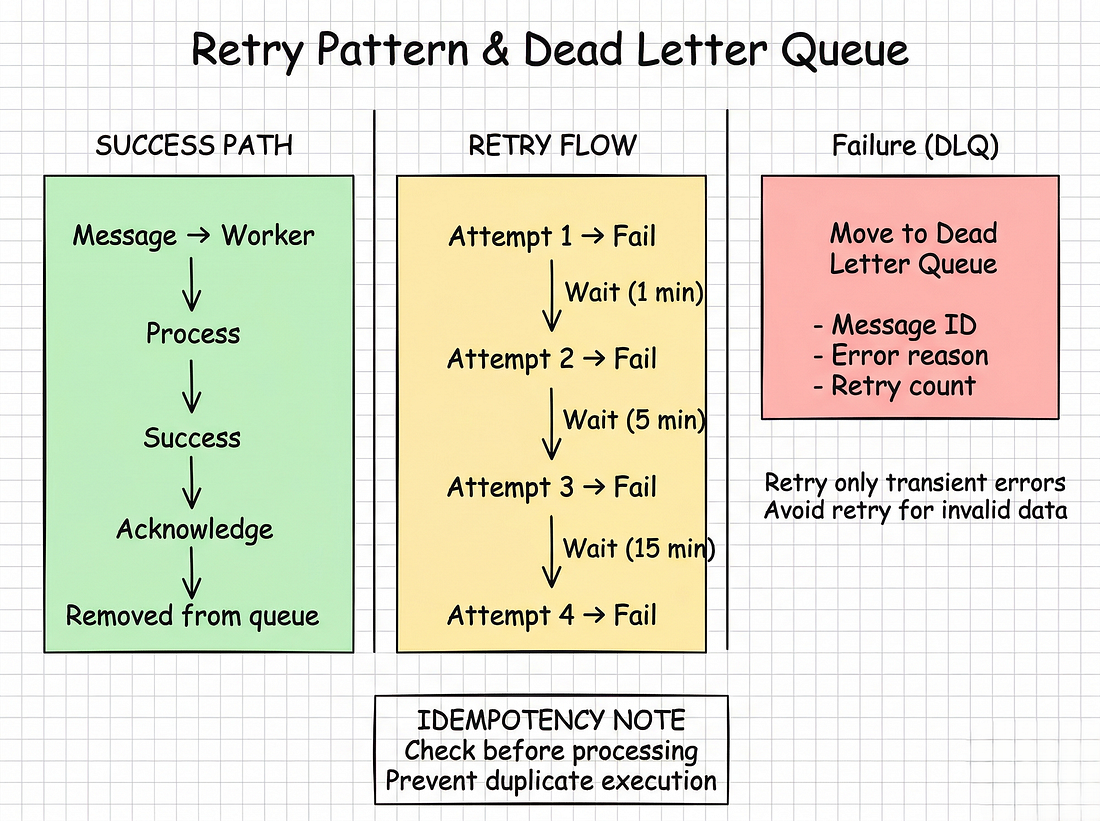
Batch operations:
@app.post("/process-files")
async def process_files(files: list):
    job_id = str(uuid.uuid4())

    for file in files:
        producer.push({
            "type": "process_file",
            "job_id": job_id,
            "file_path": file.path,
            "file_size": file.size
        })

    return {
        "job_id": job_id,
        "status": "processing",
        "files": len(files)
}#Phần 4: Retry Patterns & Error Handling
#At-Least-Once Delivery
Queues đảm bảo at-least-once delivery. Message được giao ít nhất một lần, có thể nhiều hơn (do network issues, retries).
Code của bạn phải idempotent.
# SAI (không idempotent)
def process_order(order_id):
    charge_credit_card(order_id, 100)  # Tính tiền 2 lần nếu chạy 2 lần!

# ĐÚNG (idempotent)
def process_order(order_id):
    if db.order_already_charged(order_id):
        return  # Đã xử lý rồi

    charge_credit_card(order_id, 100)
db.mark_order_charged(order_id)#Retry với Exponential Backoff
import time

class RetryableConsumer:
    MAX_RETRIES = 3
    DELAYS = [60, 300, 900]  # 1 phút, 5 phút, 15 phút

    def process_with_retry(self, message, delivery_tag):
        for attempt in range(self.MAX_RETRIES + 1):
            try:
                self.process_message(message)
                self.channel.basic_ack(delivery_tag=delivery_tag)
                return
            except TemporaryError as e:
                if attempt < self.MAX_RETRIES:
                    delay = self.DELAYS[attempt]
                    print(f"Attempt {attempt + 1} failed, retrying in {delay}s: {e}")
                    time.sleep(delay)
                else:
                    # Hết số lần retry, chuyển sang DLQ
                    self.send_to_dlq(message)
                    self.channel.basic_ack(delivery_tag=delivery_tag)
            except PermanentError:
                self.send_to_dlq(message)
                self.channel.basic_ack(delivery_tag=delivery_tag)
returnKhi nào nên retry:
- Network timeouts
- Service tạm thời down
- Rate limits
Khi nào KHÔNG nên retry:
- Dữ liệu không hợp lệ
- Authentication failures
- Lỗi logic
#Dead Letter Queue (DLQ)
Failed messages được chuyển đến DLQ để kiểm tra:
# Khai báo DLQ
channel.queue_declare(queue='tasks_dlq', durable=True)

# Producer cho DLQ
def send_to_dlq(message):
    dlq_message = {
        **message,
        "error": str(e),
        "failed_at": datetime.now().isoformat(),
        "retry_count": attempt + 1
    }

    channel.basic_publish(
        exchange='',
        routing_key='tasks_dlq',
        body=json.dumps(dlq_message),
        properties=pika.BasicProperties(
            delivery_mode=2
        )
)#Phần 5: Kafka vs RabbitMQ
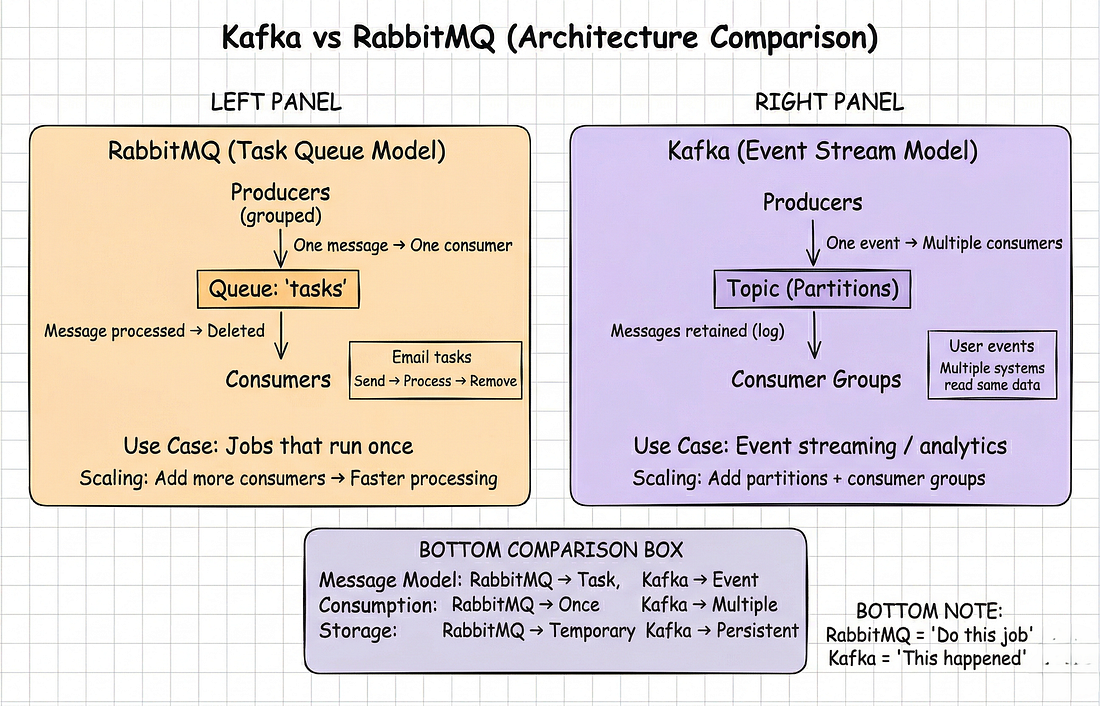
#Sự Khác Biệt Cơ Bản
| Đặc điểm | RabbitMQ | Kafka |
|---|---|---|
| Bản chất | Task queue | Event log |
| Sau khi consume | Message bị xóa | Message được giữ lại (retention policy) |
| Consumer | Một consumer mỗi message | Nhiều consumer đọc cùng message |
| Mục đích | "Làm việc này" | "Việc này đã xảy ra" |
#RabbitMQ: Task Queue
# Producer
queue.push({"type": "resize_image", "path": "/uploads/photo.jpg"})

# Consumer - một worker xử lý
def resize_image(message):
    resize(message["path"])
message.ack()Hoàn hảo cho:
- Gửi email
- Xử lý file
- Tạo báo cáo
- Các tác vụ một lần
#Kafka: Event Stream
# Producer
kafka.send("user.events", {"user_id": 123, "event": "page_view", "page": "/home"})

# Consumer 1 - Analytics
kafka.subscribe("user.events")
def track_analytics(event):
    analytics_db.increment(event["event"])

# Consumer 2 - Recommendations
kafka.subscribe("user.events")
def update_recommendations(event):
rec_engine.track(event["user_id"], event["page"])Hoàn hảo cho:
- Activity logs
- Click tracking
- Audit logs
- Nhiều consumers cần cùng dữ liệu
#Khi Nào Chọn Gì
Chọn RabbitMQ nếu:
- Task queue
- Team < 10 engineers
- Cần nó hoạt động ngay hôm nay
- Throughput < 50K msg/sec
Chọn Kafka nếu:
- Event streaming
- Nhiều consumers cần cùng events
- Cần event replay
- Throughput > 100K msg/sec
Ví dụ thực tế — Hệ thống dùng cả hai:
RabbitMQ:
- Order emails (2K/ngày)
- PDF generation (500/ngày)
- Image resizing (1K/ngày)
- Tổng: 3.5K tasks/ngày
Kafka:
- User events (200K/ngày)
- Click tracking (300K/ngày)
- Search queries (50K/ngày)
- Tổng: 550K events/ngày
Lời khuyên: Bắt đầu với RabbitMQ. Thêm Kafka khi có nhu cầu thực sự.
#Phần 6: Kiến Trúc Production
#Hệ Thống Hoàn Chỉnh
API Servers (3)
    |
    ↓ Queue tasks
    |
RabbitMQ Cluster (3 nodes)
    |
    ↓ Distribute work
    |
Workers (Auto-scaling)
    - Email workers: 5
    - File workers: 3
    - Report workers: 1
    |
    ↓
External Services (Email, Storage, etc.)
Kiến trúc chi tiết:
# API Server - FastAPI
from fastapi import FastAPI
import pika
import json

app = FastAPI()
connection = pika.BlockingConnection(
    pika.ConnectionParameters('rabbitmq-cluster')
)
channel = connection.channel()

@app.post("/api/send-newsletter")
def send_newsletter(payload: NewsletterRequest):
    users = get_subscribed_users()

    for user in users:
        channel.basic_publish(
            exchange='email.tasks',
            routing_key='email.send',
            body=json.dumps({
                "user_id": user.id,
                "email": user.email,
                "template": payload.template_id
            }),
            properties=pika.BasicProperties(
                delivery_mode=2,
                priority=1
            )
        )

return {"queued": len(users)}# Worker - Background Service
import pika
import json
class EmailWorker:
def __init__(self, worker_id):
self.worker_id = worker_id
self.connection = pika.BlockingConnection(...)
self.channel = self.connection.channel()
self.channel.basic_qos(prefetch_count=10)
def start(self):
self.channel.basic_consume(
queue='email.send',
on_message_callback=self.handle_email
)
self.channel.start_consuming()
def handle_email(self, ch, method, properties, body):
data = json.loads(body)
try:
send_email_smtp(data["email"], data["template"])
ch.basic_ack(method.delivery_tag)
logger.info(f"Worker {self.worker_id}: Sent to {data['email']}")
except smtplib.SMTPServerDisconnected:
ch.basic_nack(method.delivery_tag, requeue=True)
except Exception as e:
logger.error(f"Failed: {e}")
ch.basic_nack(method.delivery_tag, requeue=False) # → DLQ#Monitoring
Metrics quan trọng:
from prometheus_client import Gauge, Counter

queue_depth = Gauge('queue_depth', 'Messages waiting', ['queue'])
processed = Counter('messages_processed_total', 'Messages processed', ['queue', 'status'])
dlq_count = Gauge('dlq_count', 'Messages in DLQ', ['queue'])

# Worker health check
@app.get("/health")
def health():
    return {
        "queue_depth": queue_depth,
        "dlq_count": dlq_count,
        "workers_active": len(active_workers)
}Dashboard:
- Queue depth
- Processing rate
- Error rate
- Consumer lag
Alerts:
- Depth > 1,000
- DLQ > 100
- Error rate > 5%
#Auto-scaling
def autoscale():
    depth = get_queue_depth('emails')
    workers = get_worker_count()

    if depth > 500 and workers < 10:
        launch_worker()
    elif depth < 50 and workers > 2:
        terminate_worker()

# Rules:
# Depth < 50: 2 workers
# Depth 50–200: 5 workers
# Depth > 500: 10 workers#Phần 7: Best Practices
#Nên Làm
- Idempotent handlers — Luôn kiểm tra đã xử lý chưa
- Set timeouts — Tránh worker treo vô thời hạn
@timeout(seconds=300)
def process_task(message):
    # Xử lý ở đây
pass- Dùng DLQ — Cần thiết để debug failed messages
- Monitor mọi thứ — Queue depth, rate, errors, lag
- Log chi tiết —
logger.info(f"Processed {msg_id} for user {user_id}")
#Không Nên Làm
- Đừng queue operations nhanh
# Không queue (operation 5ms)
def get_user(id):
    return db.get(id)

# Queue (operation 5 phút)
def process_video(path):
queue.push({"type": "process_video", "path": path})- Đừng bỏ qua errors — Luôn xử lý exceptions và retry phù hợp
- Đừng dùng Kafka cho tác vụ đơn giản — Task queue → RabbitMQ; Event stream → Kafka
- Đừng bỏ qua monitoring — Không có metrics, bạn đang mù
#Tổng Kết
#Từ Blocking Đến Non-Blocking
Trước đây (Synchronous):
- API timeouts
- Server quá tải
- Operations thất bại
- Không scale được
Sau khi thêm message queues:
- Phản hồi nhanh (2 giây thay vì 45 phút)
- Workers có thể scale
- Tự động retry
- Không mất công việc
- Horizontal scaling hoạt động
Tác động sau queues:
- Email campaigns: 10K gửi không timeout
- File processing: 1K files/ngày trong background
- API p95: Dưới 200ms
- Zero blocking
- Horizontal scaling hoạt động
#Bài Học Chính
- Queue tác vụ chậm → Nếu > 1 giây, hãy queue nó
- Chọn đúng công cụ → RabbitMQ cho tasks, Kafka cho events
- Idempotent → Messages có thể được gửi hai lần
- Implement retries → Lỗi tạm thời luôn xảy ra
- Dùng DLQ → Cần thiết cho debugging
- Monitor → Theo dõi depth, rate, errors
- Bắt đầu đơn giản → RabbitMQ trước