Chiến Lược Caching Trong Production: Cách Chúng Tôi Làm API Nhanh Hơn 67 Lần
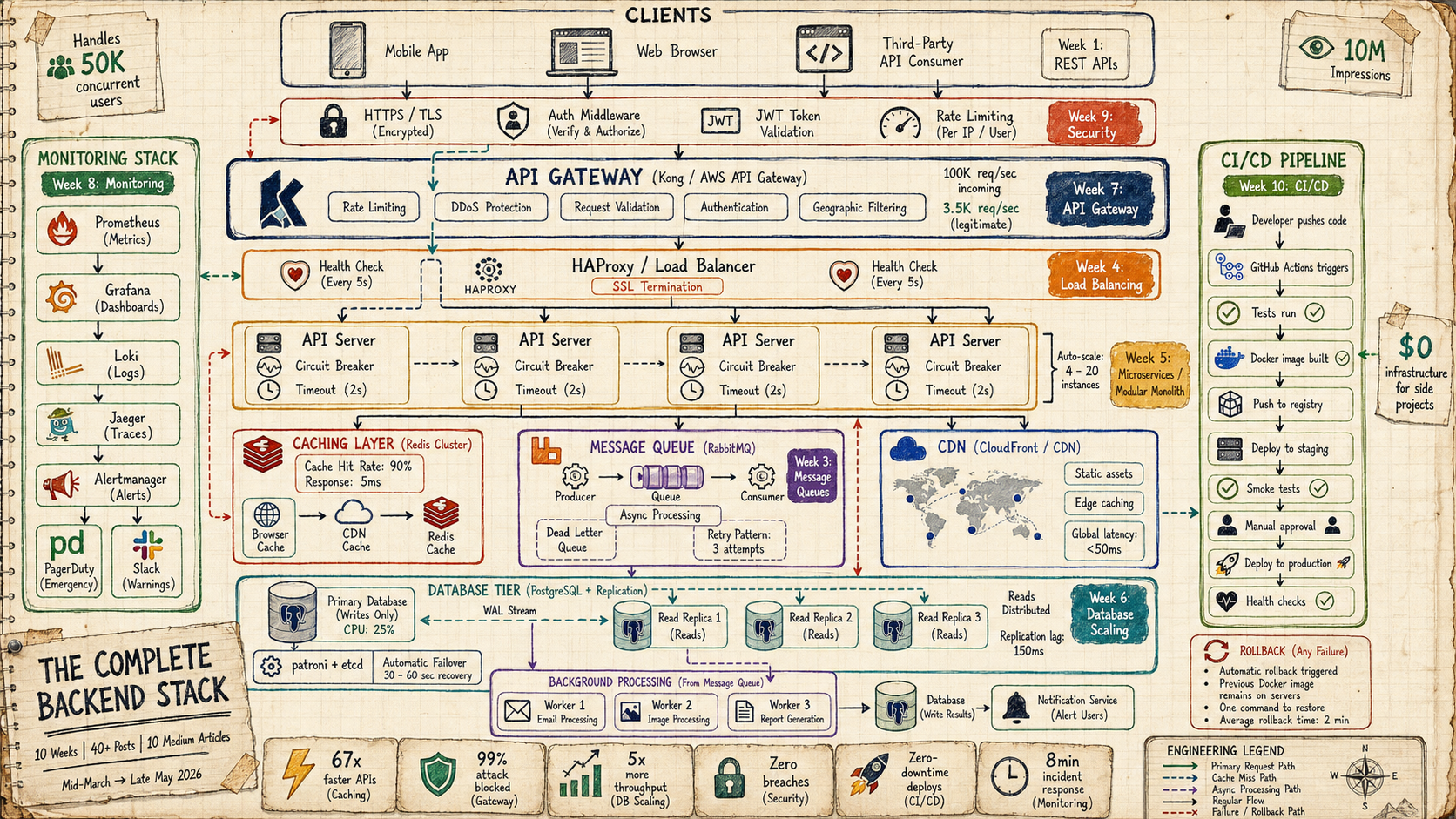
Tuần 2 của Series Thiết Kế Hệ Thống - Từ 800ms xuống 12ms với Redis, cache invalidation và CDN

Chiến Lược Caching Trong Production: Cách Chúng Tôi Làm API Nhanh Hơn 67 Lần
#Tuần 2 của Series Thiết Kế Hệ Thống — Từ 800ms xuống 12ms với Redis, cache invalidation và CDN
#Giới Thiệu
Tuần trước chúng ta đã xây dựng nền tảng: REST API design, database selection, indexes, và response patterns.
Tuần này, chúng ta giải quyết vấn đề số một của hệ thống production: tốc độ.
Cụ thể, bạn sẽ học:
- Tại sao caching là nhân tố hiệu suất lớn nhất — không gì khác có thể cải thiện 10–100x dễ dàng như vậy
- Cách triển khai Redis từ đầu với các pattern đúng
- Chiến lược cache invalidation — bài toán khó thực sự
- Cách thiết lập và tối ưu CDN cho edge performance
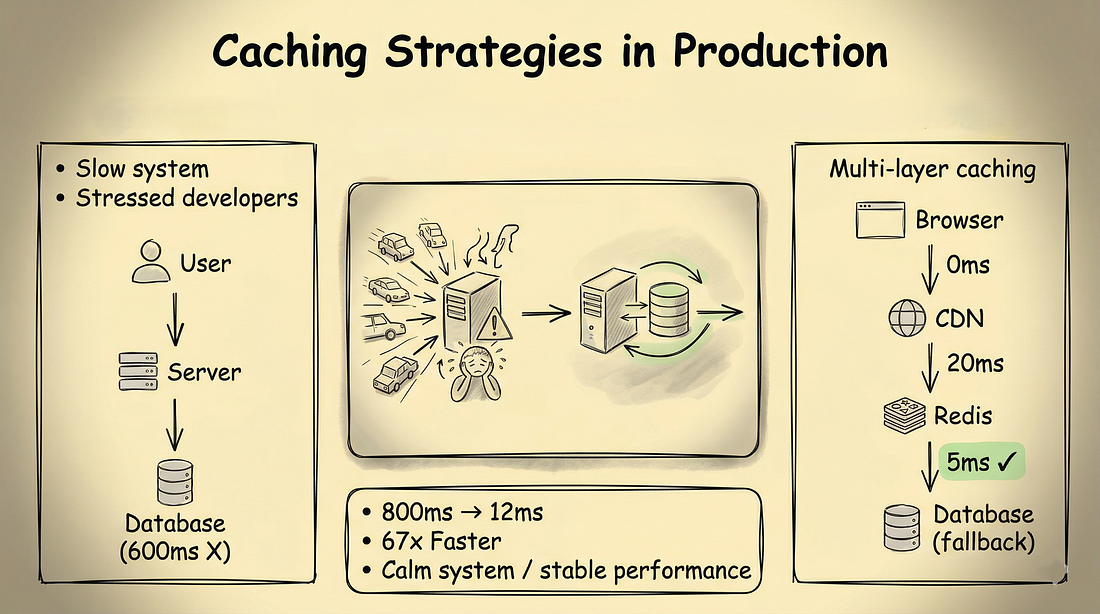
- Kiến trúc multi-layer caching từ browser → application → Redis → database
- Ví dụ production thực tế với metrics và bài học
Kết thúc bài này, bạn sẽ hiểu không chỉ cách cache, mà còn cái gì nên cache, và cách invalidate cache đúng cách.
Bạn sẽ có kiến thức để triển khai caching giúp hệ thống của bạn nhanh hơn 10–100 lần.
#Phần 1: Tại Sao Caching Lại Quan Trọng (Cuộc Khủng Hoảng Hiệu Suất)
#Vấn Đề
API của bạn hoạt động tốt với 100 users.
Rồi 1.000 users.
Rồi 10.000 users.
Đột nhiên:
- Response time: 800ms (và đang tăng)
- Database CPU: 85%
- Database connections: Cạn kiệt
- API servers: Mở rộng nhưng không giúp ích gì
- Users: Phàn nàn
- Sếp: Không vui
Đây là chúng tôi cách đây 6 tháng.
Chúng tôi có hai lựa chọn:
- Nâng cấp database server — $5.000/tháng
- Thêm caching — $200/tháng
Chúng tôi chọn caching.
Đây là những gì đã xảy ra.
#Giải Pháp: Cache Layer
Thay vì truy vấn database cho mỗi request — lưu trữ kết quả trong bộ nhớ tốc độ cao (Redis) và phục vụ từ đó.
import redis
import json

# Kết nối Redis
cache = redis.Redis(host='localhost', port=6379, db=0)

@app.get("/users/{user_id}")
def get_user(user_id: int):
    # 1. Kiểm tra cache trước
    cache_key = f"user:{user_id}"
    cached = cache.get(cache_key)

    if cached:
        # Cache hit! Trả về ngay lập tức
        return json.loads(cached)

    # 2. Cache miss — truy vấn database
    user = db.query("SELECT * FROM users WHERE id = %s", user_id)

    if not user:
        raise HTTPException(status_code=404)

    # 3. Lưu vào cache với TTL 5 phút
    cache.setex(cache_key, 300, json.dumps(user))

return userTác động:
| Metric | Trước caching | Sau caching (90% hit rate) |
|---|---|---|
| Response time trung bình | 600ms | 45ms |
| p95 response time | 1.200ms | 180ms |
| p99 response time | 3.200ms | 650ms |
| Database CPU | 85% | 15% |
| Database queries/sec | 1.000 | 100 |
| API throughput | ~1.500 req/sec | ~15.000 req/sec |
| Chi phí server/tháng | $5.200 | $1.800 |
Kết quả:
- Response time: 800ms → 12ms (nhanh hơn 67 lần)
- Database load: Giảm 95%
- Tiết kiệm chi phí: $3.400/tháng
#Tại Sao In-Memory Lại "Kỳ Diệu"?
# Database query: ~50-200ms (I/O, disk)
# Redis lookup: ~1-5ms (RAM, in-memory)

# Cache hit time = Redis latency + Deserialization
#                  1ms        +        2ms         = 3ms

# Cache miss time = Redis latency + DB query + Serialization + Redis write
#                    1ms         +   150ms   +     2ms      +     1ms    = 154ms

# Database query (không cache) = 150ms
# Cache hit (có cache)         = 3ms
# Lợi ích:                     = 50x nhanh hơn!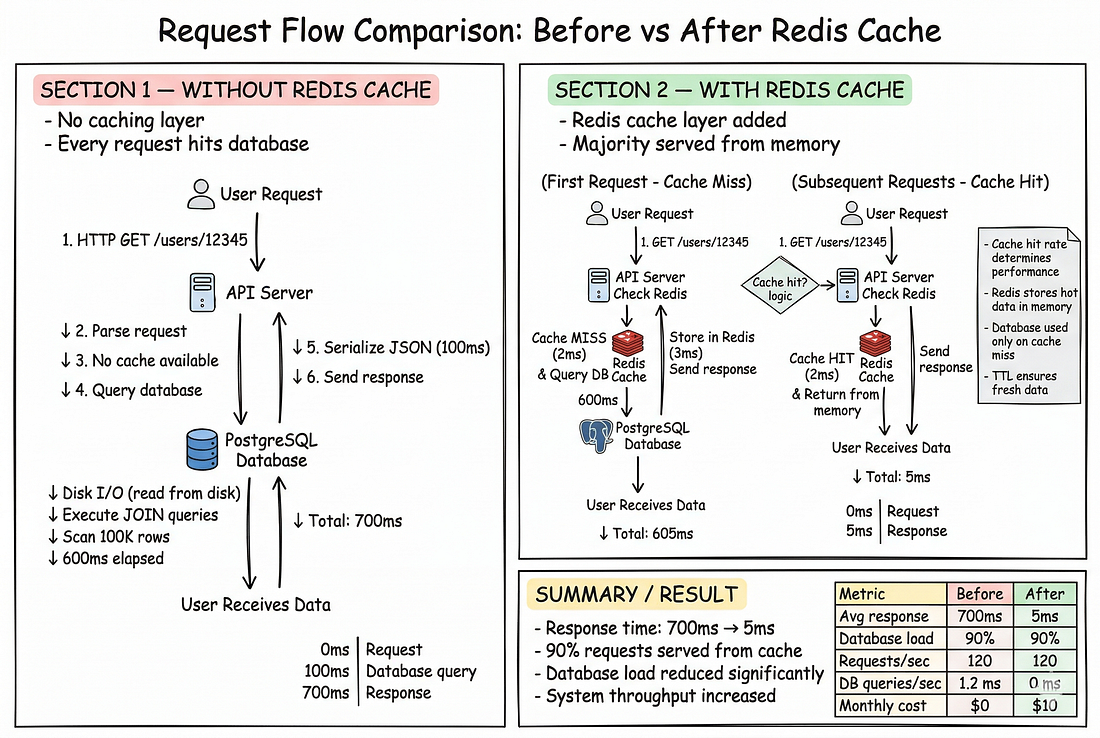
#Phần 2: Redis Fundamentals (Hướng Dẫn Triển Khai)
#Cache-Aside Pattern (Phổ Biến Nhất)
Đây là pattern phổ biến nhất và dễ triển khai nhất:
def get_user(user_id: int):
    cache_key = f"user:{user_id}"

    # Bước 1: Kiểm tra cache
    result = cache.get(cache_key)
    if result:
        return result

    # Bước 2: Cache miss — lấy từ database
    user = database.get_user(user_id)

    # Bước 3: Lưu vào cache
    cache.setex(cache_key, 300, user)

    # Bước 4: Trả về
return userLuồng này được gọi là Cache-Aside vì cache nằm "bên cạnh" — ứng dụng tự quản lý việc đọc/ghi cache.
#Performance Benchmarks
import time
from statistics import median, p95, p99

# Benchmark: database query
times_db = []
for _ in range(100):
    start = time.time()
    user = db.query("SELECT * FROM users WHERE id = %s", rand_id())
    times_db.append((time.time() - start) * 1000)

print(f"Database — p50: {median(times_db):.1f}ms, p95: {p95(times_db):.1f}ms")
# Database — p50: 45ms, p95: 120ms

# Benchmark: Redis cache hit
times_cache = []
for _ in range(100):
    start = time.time()
    user = cache.get(f"user:{rand_id()}")
    times_cache.append((time.time() - start) * 1000)

print(f"Cache hit — p50: {median(times_cache):.1f}ms, p95: {p95(times_cache):.1f}ms")
# Cache hit — p50: 1.2ms, p95: 3.5ms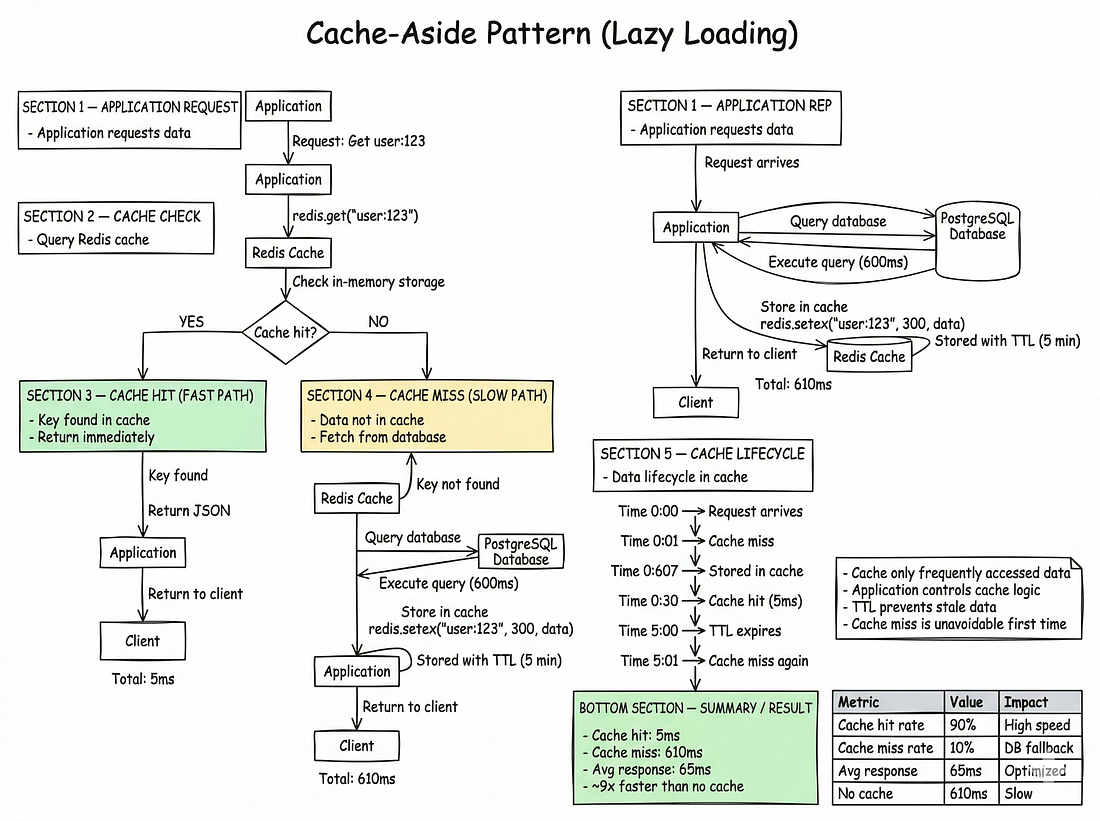
#Các Kiểu Dữ Liệu Redis Hữu Ích
# String — cache đơn giản
cache.setex("user:1", 300, json.dumps(user_data))

# Hash — lưu object, truy xuất field riêng lẻ
cache.hset("user:1", mapping={"name": "John", "email": "john@x.com"})
name = cache.hget("user:1", "name")

# List — hàng đợi, feed
cache.lpush("notifications:1", "new_message")
notifications = cache.lrange("notifications:1", 0, -1)

# Set — quan hệ, tags
cache.sadd("user:1:followers", 2, 3, 4)
followers = cache.smembers("user:1:followers")

# Sorted Set — leaderboards, xếp hạng
cache.zadd("leaderboard", {"user:1": 100, "user:2": 90})
top = cache.zrevrange("leaderboard", 0, 9, withscores=True)

# Thời gian sống (TTL) tự động
cache.expire("temp_data", 60) # Hết hạn sau 60 giây#Phần 3: Chiến Lược Cache Invalidation (Bài Toán Khó)
Có hai điều khó trong khoa học máy tính: cache invalidation, naming things, và off-by-one errors. — Phil Karlton
#Chiến Lược 1: TTL (Time To Live)
Đơn giản nhất: Đặt thời gian hết hạn trên tất cả dữ liệu cache.
# Cache trong 5 phút
cache.setex("user:123", 300, json.dumps(user_data))

# Cache trong 1 giờ
cache.setex("product_catalog", 3600, json.dumps(catalog))

# Cache trong 1 ngày (dữ liệu hiếm khi thay đổi)
cache.setex("country_list", 86400, json.dumps(countries))Khi nào dùng:
- Dữ liệu ít thay đổi
- Không quan trọng nếu dữ liệu hơi cũ
- Dễ triển khai
Khi nào không nên dùng:
- Cần dữ liệu real-time
- Dữ liệu thay đổi liên tục
- Không chịu được dữ liệu cũ
#Chiến Lược 2: Write-Through Cache
Cập nhật cache ngay khi dữ liệu thay đổi.
@app.post("/users")
def create_user(user: User):
    # 1. Ghi vào database
    user_id = db.create_user(user)

    # 2. Ghi vào cache NGAY LẬP TỨC
    cache.setex(f"user:{user_id}", 300, json.dumps(user.dict()))

    return {"id": user_id}

@app.patch("/users/{user_id}")
def update_user(user_id: int, updates: dict):
    # 1. Cập nhật database
    db.update_user(user_id, updates)

    # 2. Cập nhật cache NGAY LẬP TỨC
    updated_user = db.get_user(user_id)  # Lấy dữ liệu mới
    cache.setex(f"user:{user_id}", 300, json.dumps(updated_user))

return {"message": "Updated"}| Ưu điểm | Nhược điểm |
|---|---|
| Dữ liệu cache luôn mới | Ghi chậm hơn (phải ghi vào cả DB và cache) |
| Không có stale data | Phức tạp hơn TTL |
| Dễ hiểu | Ghi double (DB + cache) |
#Chiến Lược 3: Write-Aside (Cache Invalidation)
Xóa cache khi dữ liệu thay đổi, để request tiếp theo tự động refresh.
@app.patch("/users/{user_id}")
def update_user(user_id: int, updates: dict):
    # 1. Cập nhật database
    db.update_user(user_id, updates)

    # 2. Xóa cache — request tiếp theo sẽ cache lại
    cache.delete(f"user:{user_id}")

return {"message": "Updated"}Cách này hoạt động:
# Request 1: Cập nhật user
PATCH /users/123 → DB updated, cache deleted

# Request 2: Đọc user (cache miss → query DB → cache lại)
GET /users/123 → Cache miss → DB query → Set cache → Return

# Request 3: Đọc user (cache hit!)
GET /users/123 → Cache hit! → Return ngay lập tức#Vấn Đề: Thundering Herd (Cache Stampede)
Khi cache TTL hết hạn, nhiều request cùng đổ dồn vào database.
# Vấn đề: 100 request cùng lúc
# Request 1-100: cache miss cho cùng key
# Request 1-100: đều query database
# Request 1-100: đều ghi vào Redis
# Kết quả: Database bị quá tải, response time tăng vọtGiải pháp: Cache Locking (Mutual Exclusion)
import threading

cache_lock = threading.Lock()

def get_expensive_data(key: str):
    # 1. Kiểm tra cache
    cached = cache.get(key)
    if cached:
        return json.loads(cached)

    # 2. Cache miss — lock để chỉ một request xử lý
    with cache_lock:
        # Double-check: có thể request khác đã cache rồi
        cached = cache.get(key)
        if cached:
            return json.loads(cached)

        # 3. Tính toán dữ liệu (chỉ một lần)
        data = expensive_database_query()

        # 4. Lưu vào cache
        cache.setex(key, 300, json.dumps(data))

return dataHoặc dùng Redis distributed lock cho multi-server:
import uuid

def get_expensive_data_redis(key: str):
    # 1. Kiểm tra cache
    cached = cache.get(key)
    if cached:
        return json.loads(cached)

    # 2. Thử lấy lock (TTL ngắn để tránh deadlock)
    lock_key = f"lock:{key}"
    lock_token = str(uuid.uuid4())

    if cache.setnx(lock_key, lock_token):  # setnx = set if not exists
        cache.expire(lock_key, 5)  # Tự động hết hạn sau 5 giây

        try:
            # 3. Double-check
            cached = cache.get(key)
            if cached:
                return json.loads(cached)

            # 4. Tính toán
            data = expensive_database_query()
            cache.setex(key, 300, json.dumps(data))
            return data
        finally:
            # 5. Giải phóng lock (chỉ khi token còn khớp)
            if cache.get(lock_key) == lock_token:
                cache.delete(lock_key)
    else:
        # Không lấy được lock — chờ hoặc dùng dữ liệu cũ
        time.sleep(0.1)
return get_expensive_data_redis(key) # Retry#Cache Invalidation Đa Tầng
def invalidate_user_cache(user_id: int):
    # Xóa tất cả cache liên quan đến user này
    keys = [
        f"user:{user_id}",
        f"user:{user_id}:orders",
        f"user:{user_id}:feed",
        f"user:{user_id}:notifications",
    ]
    cache.delete(*keys)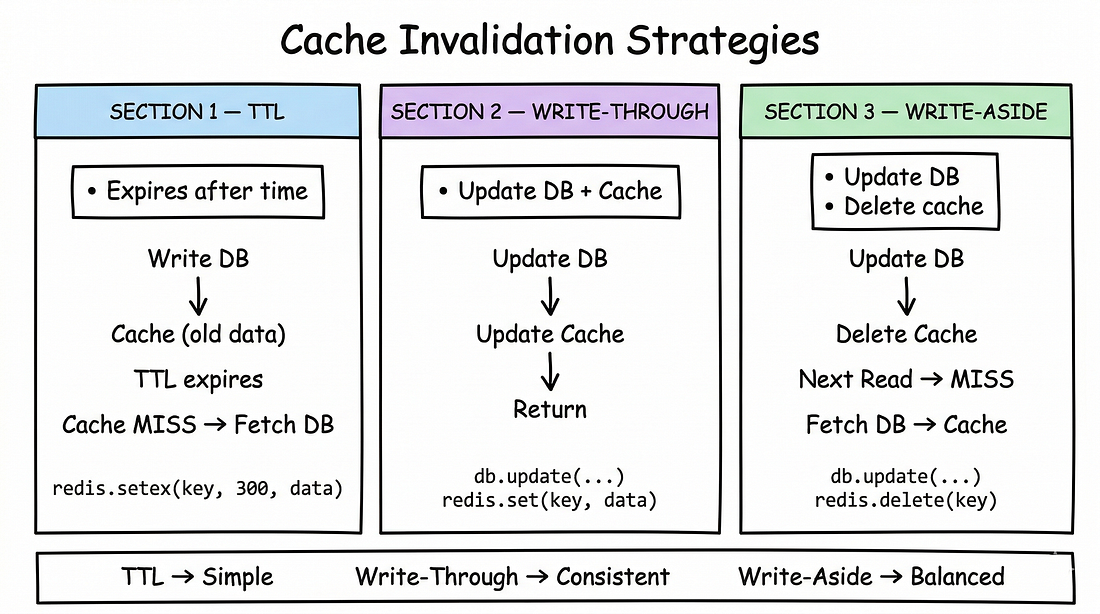
#Phần 4: CDN Caching — Hiệu Suất Ở Edge
#Tại Sao Cần CDN?
- User ở Việt Nam truy cập server ở Mỹ: ~200ms latency
- Hình ảnh, CSS, JS không thay đổi thường xuyên
- Tại sao phải request server chính cho mỗi tài nguyên tĩnh?
#CDN Giải Quyết Vấn Đề Này Như Thế Nào?
CDN lưu trữ tài nguyên tĩnh tại các edge server gần user nhất.
User (Hà Nội) → CDN Edge (Singapore, 30ms) → Origin Server (Mỹ, 200ms)#Cache Headers Cho CDN
from fastapi.responses import Response

@app.get("/static/{file_path:path}")
def serve_static(file_path: str):
    # Đặt cache headers cho CDN
    return Response(
        content=read_file(file_path),
        media_type=get_mime_type(file_path),
        headers={
            "Cache-Control": "public, max-age=31536000, immutable",
            # public: CDN có thể cache
            # max-age=31536000: cache trong 1 năm
            # immutable: trình duyệt không cần revalidate
        }
    )

@app.get("/api/products")
def get_products():
    products = db.query("SELECT * FROM products")
    return Response(
        content=json.dumps(products),
        media_type="application/json",
        headers={
            "Cache-Control": "public, max-age=60, stale-while-revalidate=300",
            # Cache trong 60 giây
            # stale-while-revalidate: trong 300 giây tiếp theo,
            # CDN có thể phục vụ dữ liệu cũ trong khi refresh background
        }
)#CDN Cache Invalidation
Khi cập nhật dữ liệu, bạn cần invalidate cache CDN:
# AWS CloudFront invalidation
import boto3

cloudfront = boto3.client('cloudfront')

def invalidate_cloudfront(paths: list):
    cloudfront.create_invalidation(
        DistributionId='YOUR_DIST_ID',
        InvalidationBatch={
            'Paths': {
                'Quantity': len(paths),
                'Items': paths
            },
            'CallerReference': str(time.time())
        }
    )

# Gọi khi cập nhật sản phẩm
invalidate_cloudfront(['/api/products', '/static/products.json'])#Chiến Lược Cache CDN Tốt Nhất
# 1. Tài nguyên tĩnh (hình ảnh, CSS, JS)
Cache-Control: public, max-age=31536000, immutable
# → Cache vô thời hạn, dùng content hash trong URL

# 2. API data thay đổi ít
Cache-Control: public, max-age=300, stale-while-revalidate=3600
# → Cache 5 phút, cho phép stale 1 giờ

# 3. API data real-time
Cache-Control: no-cache
# → CDN không cache, request đến server gốc

# 4. Dữ liệu cá nhân (user profile)
Cache-Control: private, max-age=60
# → Chỉ browser cache, CDN không cache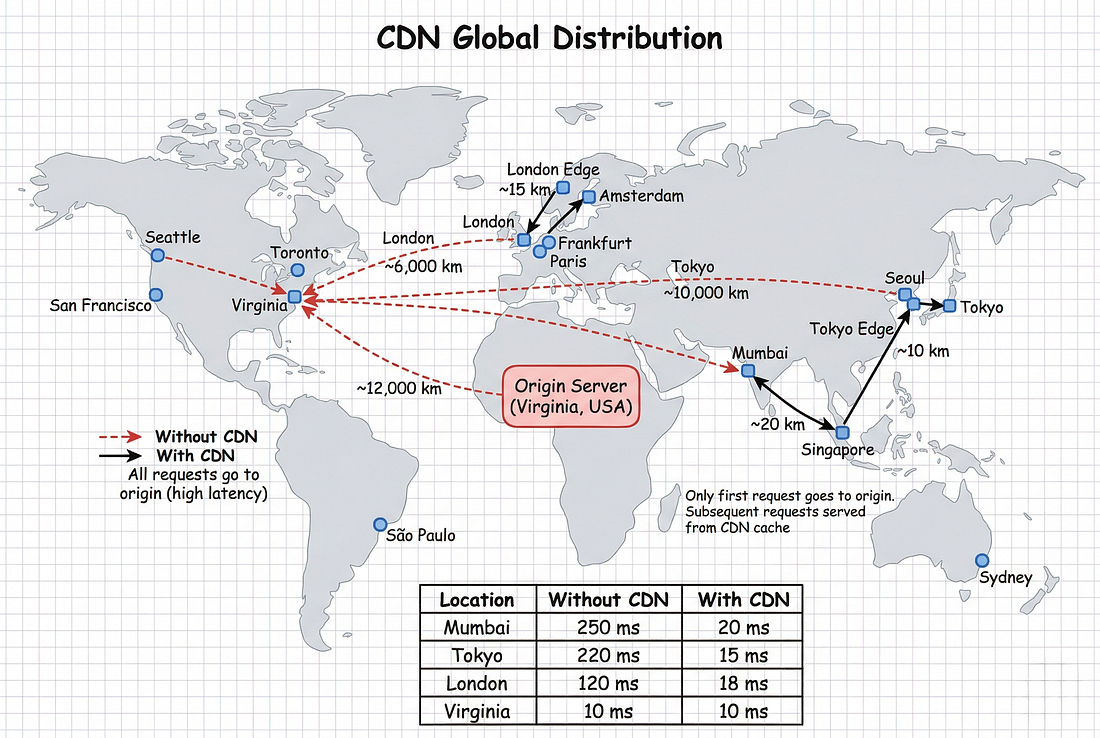
#Phần 5: Kiến Trúc Multi-Layer Caching
#Tổng Quan
Một cache là chưa đủ. Bạn cần nhiều layer:
Layer 1: Browser Cache (private)
    ↓ Cache miss
Layer 2: CDN Cache (public)
    ↓ Cache miss
Layer 3: Application Memory Cache (local)
    ↓ Cache miss
Layer 4: Redis Cache (shared/distributed)
    ↓ Cache miss
Layer 5: Database Query#Layer 1: Browser Cache
# Dùng Cache-Control headers để browser cache
Cache-Control: private, max-age=60
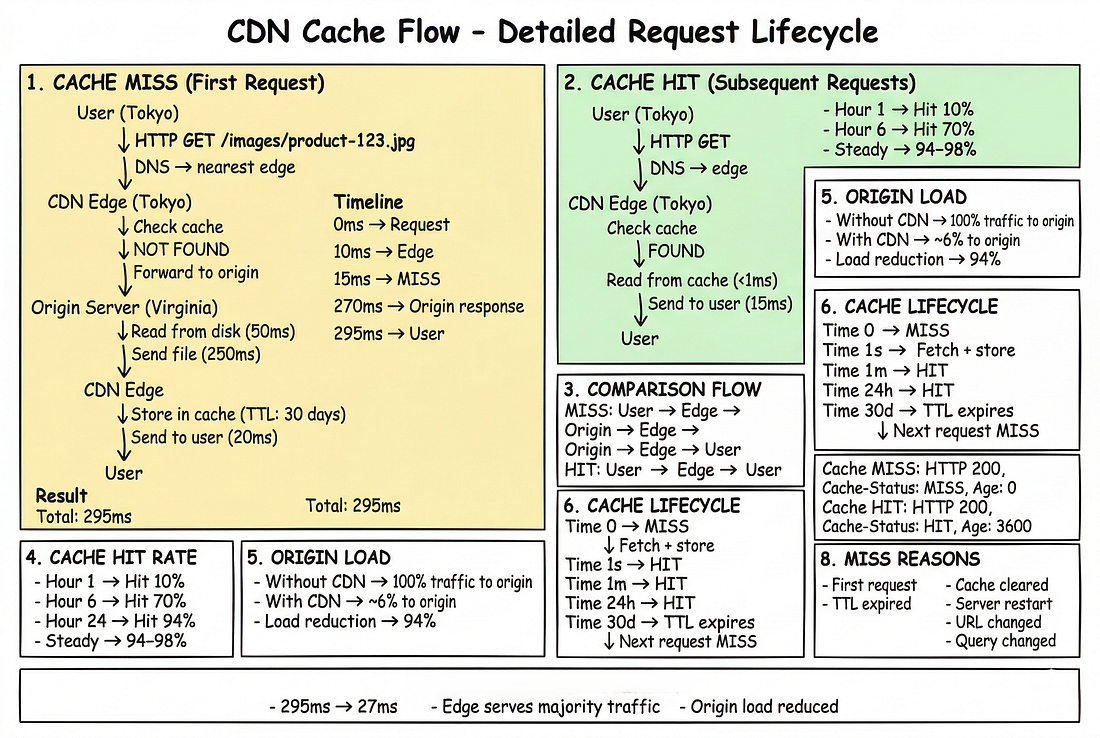
# → Browser tự cache, không cần request lại trong 60 giây#Layer 2: CDN Cache
Dùng CDN như CloudFront, CloudFlare, hoặc Fastly để cache gần user.
#Layer 3: Application Memory Cache
Cache trong bộ nhớ application (RAM) cho dữ liệu siêu nóng:
from functools import lru_cache
import time

class InMemoryCache:
    def __init__(self):
        self._cache = {}
        self._ttl = {}

    def get(self, key: str):
        if key in self._cache:
            if time.time() < self._ttl.get(key, 0):
                return self._cache[key]
            else:
                del self._cache[key]
                del self._ttl[key]
        return None

    def set(self, key: str, value, ttl: int = 30):
        self._cache[key] = value
        self._ttl[key] = time.time() + ttl

app_cache = InMemoryCache()

@app.get("/hot-products")
def get_hot_products():
    # Layer 3: Kiểm tra memory cache trước
    cached = app_cache.get("hot_products")
    if cached:
        return cached

    # Layer 4: Kiểm tra Redis
    cached = cache.get("hot_products")
    if cached:
        result = json.loads(cached)
        app_cache.set("hot_products", result, ttl=30)
        return result

    # Layer 5: Query database
    products = db.query("SELECT * FROM products WHERE hot = true LIMIT 20")

    # Lưu vào Redis (TTL 5 phút)
    cache.setex("hot_products", 300, json.dumps(products))

    # Lưu vào memory cache (TTL 30 giây)
    app_cache.set("hot_products", products, ttl=30)

return products#Layer 4: Redis (Shared Cache)
Redis là shared cache giữa tất cả server instances.
# Redis config
cache = redis.Redis(
    host='redis-cluster.example.com',
    port=6379,
    password='secret',
    decode_responses=True,
    socket_connect_timeout=2,
    socket_timeout=2,
    retry_on_timeout=True,
    health_check_interval=30
)

# Kiểm tra health
try:
    cache.ping()
except redis.ConnectionError:
    # Graceful degradation: bỏ qua cache, query database trực tiếp
    logger.warning("Redis unavailable, falling back to database")
data = db.query("SELECT * FROM products")#Kiến Trúc Production Hoàn Chỉnh
import redis
from functools import lru_cache
import json
import time

# Layer 4: Redis client
redis_cache = redis.Redis(host='redis-cluster', port=6379, decode_responses=True)

# Layer 3: In-memory cache
memory_cache = {}
memory_cache_ttl = {}

def get_from_memory(key: str):
    if key in memory_cache:
        if time.time() < memory_cache_ttl.get(key, 0):
            return memory_cache[key]
        else:
            del memory_cache[key]
            del memory_cache_ttl[key]
    return None

def set_in_memory(key: str, value, ttl: int = 30):
    memory_cache[key] = value
    memory_cache_ttl[key] = time.time() + ttl

def get_cached(key: str, query_func, ttl: int = 300, mem_ttl: int = 30):
    # Layer 3: Memory cache (nhanh nhất, ~0.01ms)
    result = get_from_memory(key)
    if result:
        return result

    # Layer 4: Redis cache (~1-5ms)
    try:
        cached = redis_cache.get(key)
        if cached:
            result = json.loads(cached)
            set_in_memory(key, result, mem_ttl)
            return result
    except redis.ConnectionError:
        pass  # Graceful degradation

    # Layer 5: Database query (~50-200ms)
    result = query_func()

    # Lưu vào Redis
    try:
        redis_cache.setex(key, ttl, json.dumps(result))
    except redis.ConnectionError:
        pass

    # Lưu vào memory cache
    set_in_memory(key, result, mem_ttl)

    return result

# Sử dụng
@app.get("/users/{user_id}")
def get_user(user_id: int):
    return get_cached(
        key=f"user:{user_id}",
        query_func=lambda: db.query("SELECT * FROM users WHERE id = %s", user_id),
        ttl=300,  # Redis: 5 phút
        mem_ttl=30  # Memory: 30 giây
)#Invalidation Đa Tầng

Khi cập nhật dữ liệu, cần invalidate tất cả các layer:
def invalidate_all_layers(key: str):
    # Layer 3: Xóa memory cache
    memory_cache.pop(key, None)
    memory_cache_ttl.pop(key, None)

    # Layer 4: Xóa Redis cache
    try:
        redis_cache.delete(key)
    except redis.ConnectionError:
        pass

    # Layer 2: CDN cache (nếu có)
    # invalidate_cloudfront([f"/{key}"])

@app.patch("/users/{user_id}")
def update_user(user_id: int, updates: dict):
    db.update_user(user_id, updates)

    # Invalidate tất cả cache layers
    invalidate_all_layers(f"user:{user_id}")

return {"message": "Updated"}#Phần 6: Những Sai Lầm Caching Thường Gặp
#Sai Lầm 1: Cache Mọi Thứ
# SAI: Cache cả query 5ms
cache.setex("fast_query_result", 300, result)
# Overhead: 3ms (serialize + Redis) cho query 5ms
# → Cache làm CHẬM hơn!

# ĐÚNG: Chỉ cache query > 250ms
if query_time > 250:
cache.setex(key, 300, result)Nguyên tắc: Chỉ cache nếu (query_time) > 10 × (serialization + Redis_latency).
#Sai Lầm 2: TTL Quá Dài
# SAI: TTL quá dài cho dữ liệu thay đổi thường xuyên
cache.setex("inventory_count", 86400, count)  # 24 giờ!
# → Hàng tồn kho đã thay đổi, nhưng cache vẫn cũ

# ĐÚNG: TTL phù hợp với tần suất thay đổi
cache.setex("inventory_count", 60, count) # 1 phút#Sai Lầm 3: Không Xử Lý Graceful Degradation
# SAI: Redis die = API die
def get_user(user_id):
    cached = redis_cache.get(f"user:{user_id}")
    return cached  # Redis die → Exception!

# ĐÚNG: Fallback về database khi Redis unavailable
def get_user(user_id):
    try:
        cached = redis_cache.get(f"user:{user_id}")
        if cached:
            return json.loads(cached)
    except redis.ConnectionError:
        pass  # Redis die → query database

return db.query("SELECT * FROM users WHERE id = %s", user_id)#Sai Lầm 4: Cache Stampede
Đã đề cập ở Phần 3. Luôn dùng locking hoặc early expiration cho dữ liệu nóng.
#Sai Lầm 5: Không Monitoring
# Theo dõi cache metrics
cache_hits = 0
cache_misses = 0

def get_cached_with_metrics(key, query_func):
    global cache_hits, cache_misses

    cached = cache.get(key)
    if cached:
        cache_hits += 1
        return cached

    cache_misses += 1
    result = query_func()
    cache.setex(key, 300, json.dumps(result))
    return result

# Log metrics
hit_rate = cache_hits / (cache_hits + cache_misses) * 100
logger.info(f"Cache hit rate: {hit_rate:.1f}%")
# Nếu hit rate < 80% → cần xem lại chiến lược cache#Phần 7: Production Checklist
#Trước Khi Triển Khai Caching
- [ ] Bạn đã đo thời gian query database chưa?
- [ ] Bạn đã tính serialization overhead chưa?
- [ ] Chiến lược invalidation là gì? TTL? Write-through? Write-aside?
- [ ] Cache stampede có là vấn đề không?
- [ ] Bạn có graceful degradation khi Redis die không?
#Trong Khi Triển Khai
- [ ] Set memory limit cho Redis (tránh OOM)
- [ ] Cấu hình maxmemory-policy (allkeys-lru hoặc volatile-lru)
- [ ] Dùng Redis cluster cho high availability
- [ ] Monitor cache hit rate, memory usage, latency
- [ ] Set timeout ngắn cho Redis connections (2-3s)
#Sau Khi Triển Khai
- [ ] So sánh metrics trước và sau caching
- [ ] Kiểm tra p95 và p99 latency
- [ ] Kiểm tra database load
- [ ] Xem xét cache hit rate (mục tiêu > 85%)
- [ ] Alert khi hit rate giảm đột ngột
#Tổng Kết
#Hành Trình Từ 800ms Đến 12ms
-
Chúng tôi bắt đầu với API chậm.
- Database là bottleneck.
- Response time không thể chấp nhận.
-
Chúng tôi thêm caching.
- Không chỉ một cache, mà một kiến trúc multi-layer hoàn chỉnh.
- Browser cache cho tài nguyên tĩnh.
- Application memory cho dữ liệu siêu nóng.
- Redis cho shared state giữa các server.
- Smart invalidation qua tất cả các layer.
-
Kết quả:
- Response time: 800ms → 12ms (nhanh hơn 67 lần)
- Database load: Giảm 95%
- Chi phí server: Tiết kiệm $3.400/tháng
- User experience: Cải thiện đáng kể
#Bài Học Chính
- Caching là nhân tố hiệu suất lớn nhất — Không gì khác dễ dàng cải thiện 10–100x
- Cache invalidation là quan trọng — Chọn chiến lược đúng (TTL, write-through, hoặc write-aside) cho use case của bạn
- Multi-layer architecture thắng — Đừng chỉ dùng một cache; kết hợp browser, CDN, Redis
- Monitor mọi thứ — Theo dõi hit rates, latency, memory usage
- Xử lý failures gracefully — Cache là optimization, không phải dependency